


BinWiz VPN
4.3349.00 Reviews
App Specs
- Version
- 1.2.2
- Updated On
- License
- Free
- Downloads
- 5,000,000+
- Developer
- BinWiz Team
- Categories
- Tools
- Platform
- Android
Screenshots
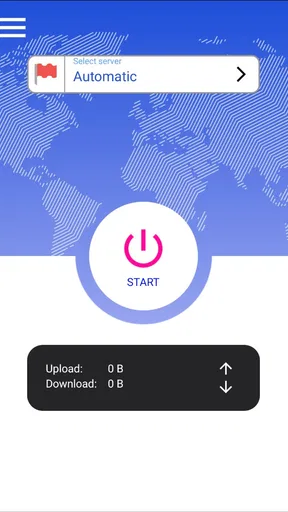
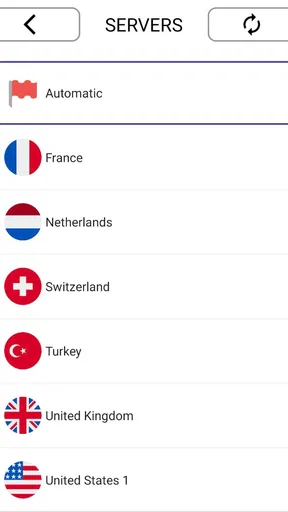
 Analysis by AppCompare
I judge a VPN less by a dramatic speed claim than by whether it gets out of the way during ordinary tasks. BinWiz VPN is aimed at people who want a quick route to a protected connection without spending time learning networking terms. That simplicity is appealing, but I’d still treat a VPN as one part of online privacy, not a guarantee that every activity is anonymous or every connection will be fast.
What speed feels like in everyday use
VPN speed depends on more than the app: the network you start with, the distance to the chosen server, and how busy that route is can all affect the result. So I wouldn’t assume that a connection will feel identical from one place or time to another. For routine browsing and checking messages, the practical question is whether pages and apps remain comfortable to use, rather than whether a VPN can promise an unchanged connection.
If a video starts taking longer to load, I’d first compare a nearby server with the location I selected. A distant location may be useful for a specific purpose, but it can add delay without helping ordinary browsing. Picking the closest suitable option is a simple habit that can make a noticeable difference in how responsive a VPN feels.
When the connection has more to do
Busy moments are a better test than a quick glance at a home screen. Picture checking a work document on café Wi-Fi, then switching to a video call while messages and other apps are active. In that situation, I’d value a connection that remains usable more than a headline speed figure. If the call becomes choppy, pausing a large download or trying a nearer server is a sensible first step; it helps distinguish a crowded network from a problem with the VPN route.
For travel, I’d connect before opening anything sensitive on a public network, then check that the VPN is still active after moving between Wi-Fi and mobile data. A change of network can disrupt many VPN connections, so I wouldn’t assume that protection carries over without interruption. Reconnecting before signing in or sending a private message is a small routine that can prevent an easy-to-miss gap.
Reliability matters more than a perfect first connection
A VPN earns trust through steady behavior, not just a successful first tap. If a page stops loading, I’d check whether other apps have internet access, reconnect, and then try another server before changing phone settings. That order keeps troubleshooting manageable and helps avoid blaming the app for an outage on the underlying network.
I also like to decide in advance what I’ll do if a VPN drops during an important task. For casual browsing, reconnecting may be enough. For a sensitive session, I’d stop until the connection is restored rather than continuing under the assumption that the VPN is still active. A VPN can help protect traffic while it is connected; it cannot make every network stable or remove the need to pay attention.
Worth Reading Before You Choose

EA SPORTS FC Mobile 26 Is a Bigger Football Game, but It Takes Time

Flipboard Shows What News Apps Must Do Beyond the Feed

Switching to Android Auto Means Rethinking Your Driving Routine

Google Calendar Makes a Crowded Week Easier to Manage

Ludo King Makes the Most of the Minutes Between Plans

Baby Panda World Brings Quick Play to Modern Phones, but Its Game Library Feels Busy
Phone limits and sensible expectations
BinWiz VPN is an Android tools app from BinWiz Team. It is free, rated for Everyone, and its current version is 1.2.2; Android 6.0 is the minimum system requirement. Those basics make it an option for many Android users, though older phones can still feel different depending on available memory, background activity, and the quality of the network. I’d close an unusually demanding app and retry before deciding a slowdown is caused by the VPN itself.
On a phone with limited battery or a weak signal, keeping a VPN connection active may be a trade-off worth noticing. I’d use it when I actually need the extra protection, especially on unfamiliar Wi-Fi, and check how the phone behaves during normal use instead of expecting the same result on every device. Anyone who needs detailed controls across a household or a precise technical setup should compare dedicated services on those specific requirements before settling on a simple mobile app.
BinWiz VPN has an average rating of 4.3 from around 15,000 ratings and has been installed over 5 million times. It was released on October 31, 2023. Those figures offer a sense of its reach, but they don’t tell me whether a particular server will be fast at a particular hour, so I’d make that judgment through my own routine rather than popularity alone.
For a basic decision, I’d ask myself three things: do I mainly need a straightforward mobile VPN, am I willing to reconnect if a network change interrupts it, and do I need advanced configuration rather than a simple experience? If the first two fit and the last does not, BinWiz may suit me. If I need a specific privacy policy, independently documented security details, or fine-grained network controls, I’d compare alternatives and read their documentation before choosing.
VPNs also differ in what they emphasize. Some are built around extensive settings and technical visibility; others focus on a simple connection flow. A lightweight, approachable option can be easier to use consistently, while a more configurable service may be preferable for people who want to inspect protocols, tune routing, or manage several devices in a particular way. I’d choose based on the job I need done, not assume that the longest feature list is automatically better.
One useful habit is to test the app in the places where I actually plan to use it: at home, on mobile data, and on a trusted public network. I’d open a few everyday apps, note whether reconnecting is straightforward, and see whether the VPN remains convenient during a short session. This is more useful than testing once on a strong home connection and expecting the same experience on a crowded train or hotel Wi-Fi.
I’d also keep expectations about location-based access realistic. A VPN may change the apparent location of a connection, but a streaming service or website can apply its own rules and may not behave as expected. If access to one particular service is the main reason for installing a VPN, I’d check that service’s terms and test the relevant location before relying on it for a trip or an important viewing plan.
The app’s scale is notable: BinWiz VPN has over 5 million installs and 349 reviews. It is free to download, which makes trying it less of a commitment, but “free” does not answer every question about privacy or how a service is operated. I’d avoid using any VPN as a substitute for careful account security, strong passwords, or caution with links and downloads.
Another practical point is to keep the setup uncomplicated while you learn how it behaves. Start with one server choice and one familiar task, then change only one thing if the connection feels slow. Switching location, network, and phone settings all at once makes it harder to identify what helped. That measured approach is especially useful for anyone who has never used a VPN and does not want troubleshooting to become a project.
If I were helping a friend decide, I’d recommend BinWiz to someone who wants an accessible Android VPN for ordinary browsing and occasional use on public Wi-Fi, provided they are comfortable checking the connection after changing networks. I’d steer a person with strict workplace requirements, advanced routing needs, or a need to verify detailed privacy practices toward a provider whose documentation directly addresses those needs.
Feeling overwhelmed by the countless VPN options out there? Trust me, I get it. Among the sea of choices, BinWiz VPN caught my eye, and I decided to give it a whirl. After spending some quality time with it, I’m here to spill the beans on everything you need to know.
First Impressions and Setup
The first thing that struck me about BinWiz VPN was its sleek interface. It’s like the developers knew I have zero patience for complicated setups. I downloaded it straight from their website, and within minutes, I was up and running. No tech wizardry required. Just a few taps and I was ready to surf the web with my new digital cloak.
Interface and Usability
Once inside the app, I was greeted with a clean and intuitive dashboard. The interface is user-friendly, even for those who might not be the most tech-savvy. Everything is straightforward, with large buttons and clear labels. It’s like the app is gently guiding you through each step, ensuring you don’t feel lost.
Switching between different server locations is as simple as pie. I was able to hop from one country to another with just a tap. This is particularly handy if you want to access region-specific content or just feel like pretending you're in a different part of the world.
Performance and Speed
Now, let’s talk speed. I’m no fan of buffering wheels, so a speedy connection is a must. I put BinWiz through the wringer with some heavy-duty browsing, and I was pleasantly surprised. The speed difference was barely noticeable, even when connecting to servers halfway across the globe. Streaming HD content was smooth, and I didn’t encounter any annoying interruptions.
Plus, the app offers unlimited bandwidth, which means you can browse, stream, and download to your heart's content without worrying about any sneaky data caps. It’s like having an all-you-can-eat buffet, but in the digital realm.
Security Features
When it comes to security, BinWiz doesn’t mess around. It uses top-notch encryption to keep your data safe from prying eyes. Think of it as your personal bodyguard, keeping your online activities under wraps. There’s also a kill switch feature, which is a nice touch. It means if your VPN connection drops unexpectedly, your internet gets cut off too, preventing any unprotected data leaks.
Additionally, BinWiz has a strict no-logs policy. This means they don’t keep any records of your online activities. It's all about anonymity here, giving you peace of mind as you browse.
Compatibility and Customer Support
Compatibility-wise, BinWiz covers all the bases. Whether you’re on Android, iOS, Windows, or Mac, you’re good to go. I tried it on my phone and laptop, and it worked like a charm on both. It’s also compatible with routers, which is great if you want to secure all your devices at once.
As for customer support, BinWiz has a dedicated team ready to help. I reached out with a couple of questions, and they were quick to respond. It’s always reassuring to know help is just an email or chat away if you ever hit a snag.
Final Thoughts
Overall, BinWiz VPN is a solid choice in the VPN landscape. It combines ease of use with robust security features, making it an excellent option for both VPN newbies and veterans. Whether you’re looking to secure your connection on public Wi-Fi or access content from different regions, BinWiz has got you covered.
If you’re on the hunt for a VPN that doesn’t complicate things, gives you plenty of features, and keeps your data safe, BinWiz might just be your new best friend. So, why not give it a try and see if it ticks all your boxes?
Pros
- Fast connection speeds across servers
- User-friendly interface for easy navigation
- Supports multiple simultaneous connections
- Strong encryption for secure browsing
- No-log policy ensures privacy
Cons
- Limited free version features
- Occasional connection drops
- Doesn't work in some restricted regions
- In-app ads in free version
- Customer support response time can vary
FAQs for BinWiz VPN
What platforms is BinWiz VPN available on?
BinWiz VPN is available for both Android and iOS platforms. You can download it from the Google Play Store or the Apple App Store, ensuring compatibility with most modern smartphones and tablets. The app is designed to provide a seamless experience across both operating systems, offering consistent features and performance.
How does BinWiz VPN enhance my online security?
BinWiz VPN enhances your online security by encrypting your internet connection, making it difficult for hackers or third parties to access your data. It masks your IP address, providing anonymity while you browse. This is particularly useful on public Wi-Fi networks, where security risks are higher. The app also includes features like a kill switch to prevent data leaks.
Can I use BinWiz VPN to access geo-restricted content?
Yes, BinWiz VPN allows you to bypass geo-restrictions by connecting to servers in various countries. This feature enables you to access content that may be unavailable in your region, such as streaming services, websites, or apps. The app offers a wide range of server locations to choose from, enhancing your internet freedom.
Does BinWiz VPN affect my internet speed?
While using a VPN can sometimes slow down your internet connection due to encryption and routing through different servers, BinWiz VPN strives to maintain optimal speeds. It offers high-speed servers and minimal latency, ensuring a smooth browsing experience. However, the actual speed may vary based on server load and your original internet speed.
Is BinWiz VPN free to use?
BinWiz VPN offers a free version with limited features and server options. For enhanced functionality, including access to a wider range of servers and additional security features, you may consider upgrading to a premium subscription. The premium version is subscription-based, providing a more comprehensive VPN experience without ads or restrictions.


